About Services Tools Blog Contact us

Label Text and Barcode Reading

Reads the printed text and barcodes on a product photo or box label on your own Mac, including a chosen part of the image, with no online service.

  • Document Understanding & OCR
  • Footwear retail
  • Pipeline
  • Productised
  • Local/private
  • 2026

The problem

Box labels and swing tickets carry the style code and barcode the catalogue needs. Sending every image to an online service is slow. A misread code then links a colour to the wrong product.

What it does

A working image of the label or product photo goes to the Mac's built-in text recognition. Empty text fields are filled and fields that already hold text are left alone. Every barcode in the image is decoded, and a decoded product number replaces a misread code so the colour matches the right catalogue product. You can also read just one chosen area of the image.

Outcomes

  • Style codes and barcodes are read on the Mac with no online call.
  • A good barcode overrides a bad text guess.
  • A manual correction stays put because only empty fields are filled.
  • The catalogue match picks up the product number straight away.

Simplified mockup

Interactive preview with sample data. Nothing is sent to a server.

Holt Lane carton

Reader
On device
Cloud calls
0
Colour already typed
Sand
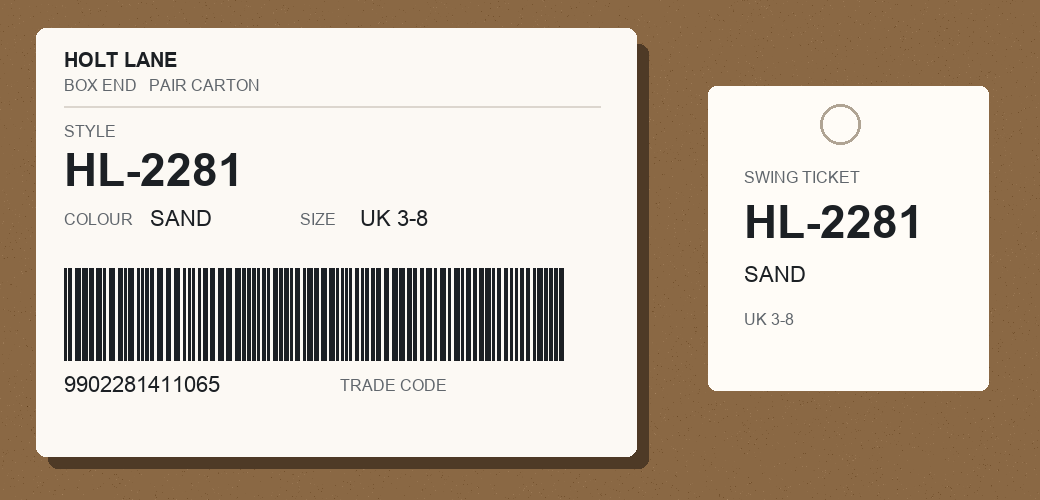
Box end showing style HL-2281, a barcode and a swing ticket
Full frame
JPEG is on the machine. Nothing sent off site.
Chosen region
Rectangle not set.

Colour record

Before this read
FieldValueRule
Style codeemptyFill when empty
ColourSandKeep typed text
Earlier guessHL-228ILetter i, not a digit
Trade codeemptyWaiting on the barcode
Catalogue linkNot queued
Apply
Manual colour is locked.

Exact link queue

Trade code ready
WhenColourStyleTrade codeStatus
10:14SandHL-22819902281411065Queued
09:02MossHL-10449901188033441Linked
YesterdayNavyHL-10449901188033510Linked

The queue uses the decoded trade number, not the OCR guess, so Sand cannot attach to the wrong style.

How it works

  1. Queue a working image of the label or the product photo.
  2. Read the text with the Mac's text recognition and fill only the empty text fields.
  3. Decode every barcode in the image.
  4. Replace a misread code with the decoded product number.
  5. Match the colour to the exact catalogue product.
  6. Limit the read to one area of the image if asked.

Pipeline

flowchart LR
  A["Label JPEG"] --> B["macOS Vision"]
  A --> C["Barcode decode"]
  B --> D["Fill empty text"]
  C --> E{"Trade code?"}
  E -->|Yes| F["Replace misread"]
  F --> G["Queue catalogue link"]
  D --> H["Label record"]