Turns an unzipped Adobe InDesign package into a Microsoft Word file in reading order, keeping text styles and colours, so reviewers can comment without the layout file.
Print & Page Layout
Mining and exploration
Tool
Product
Local/private
2026
The problem
After a shareholder update is designed, its text sits in frames inside the layout file. Reviewers who do not own InDesign cannot edit it. So the text has to be pulled out by hand before another round of comments.
What it does
The tool reads the text, styles and colours from the unzipped package and orders the page contents by position on each spread. Text that flows across linked boxes is written once, at the first box. Paragraph and character styles become Word formatting, with a simple colour conversion. The result is one Word file and a small set of preview images.
Outcomes
An editable Word file in the same reading order as the page.
Text that flows across linked boxes appears once.
Paragraph and character styles carry over, though the exact page layout does not.
Simplified mockup
Interactive preview with sample data. Nothing is sent to a server.
Reading order
A · x 18 y 24 · s1
Drilling on the north licence is ahead of the work programme.
B · x 18 y 96 · s2
Three holes were completed in March on the copper target.
Link · y 168
C · x 168 y 168 · s2
Assays are due in June. Cash at the period end was £4.2 million.
Story s2 · one block
Geometric order Top to bottom
1
Story s1 · first frame
Drilling on the north licence is ahead of the work programme.
2
Story s2 · frame 1 of 2
Three holes were completed in March on the copper target.
3
Story s2 · frame 2 of 2 · linked
Assays are due in June. Cash at the period end was £4.2 million.
1
Story s1 · emitted once
Drilling on the north licence is ahead of the work programme.
2
Story s2 · both frames, emitted once
Three holes were completed in March on the copper target. Assays are due in June. Cash at the period end was £4.2 million.
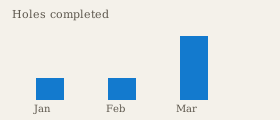
Threaded frames are not duplicated. The chart is noted, not typed into the paragraph.
Ready
Colour and styles
Press ink to screen
PrintC92 M48 Y12 K8Heading ink on the spread
→
Screen#137ACERun colour in the document
Style map
Layout style
Document style
Colour
Used on
Heading
Heading 1
#137ACE
Frame A
Body
Normal
Black
Frames B and C
Caption
Caption
#5c564c
Chart link
The page geometry stays in the layout. The document keeps reading order, styles and a simple colour, not the frame boxes.
Word file
Greyfell Exploration · March 2026
Drilling on the north licence is ahead of the work programme.
Three holes were completed in March on the copper target. Assays are due in June. Cash at the period end was £4.2 million.