Eight colourways still have empty cells
- Fill barcodes and supplier codes
- Read two box photographs
- Apply four type defaults
- Leave the till weight that is already set
- Flag the row with no source
| Colourway | Barcode | Supplier code | Weight and carton | Source |
|---|---|---|---|---|
| Calderwell Ridge chestnut · boot | – | – | – – till blank |
Waiting |
| Calderwell Ridge navy · boot | – | – | – – till blank |
Waiting |
| Fenrow Harbour grey · trainer | – | – | – – till blank |
Waiting |
| Fenrow Harbour black · trainer | – | – | – – till blank |
Waiting |
| Quayline Moor tan · loafer | – | – | – – till blank |
Waiting |
| Larch Court black · court | – | – | – – till blank |
Waiting |
| Sable Row sand · sandal | – | – | – – till 820 g |
Till set |
| Greywell Dale oak · type unset | – | – | – – till blank |
Waiting |
Box photo
0
Type default
0
Till kept
0
Still gapped
0
Sable Row sandal already had a till weight of 820 g. Weight and carton were not written, and the till figure was not touched. Identifiers were still filled. Greywell Dale has no box photograph and no product type, so it stays flagged.
Ridge chestnut label
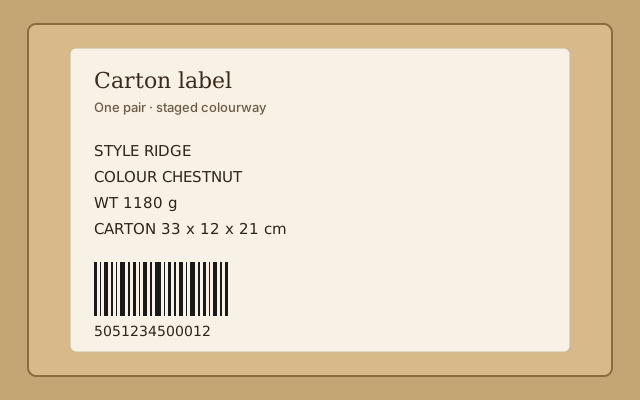
What the read returned
Used for both Ridge colourways. Navy shares the carton. The photograph is a stand-in for this preview.
Weight1,180 g
Width33 cm
Height12 cm
Length21 cm
If this read had failed, a boot would have taken the type default instead.
The most common values already on the shop. Used only when the box photograph cannot be read.
| Product type | Usual weight | Usual carton | Styles | Used on this pass |
|---|---|---|---|---|
| Boot | 1,180 g | 33 × 12 × 21 cm | 42 | Photo used instead |
| Trainer | 860 g | 31 × 12 × 20 cm | 37 | Harbour grey, Harbour black |
| Loafer | 740 g | 30 × 11 × 19 cm | 18 | Moor tan |
| Court | 680 g | 29 × 11 × 18 cm | 11 | Court black |
| Sandal | 520 g | 28 × 10 × 18 cm | 9 | Skipped, till weight kept |
| Unset | – | – | 1 | Dale oak stays gapped |