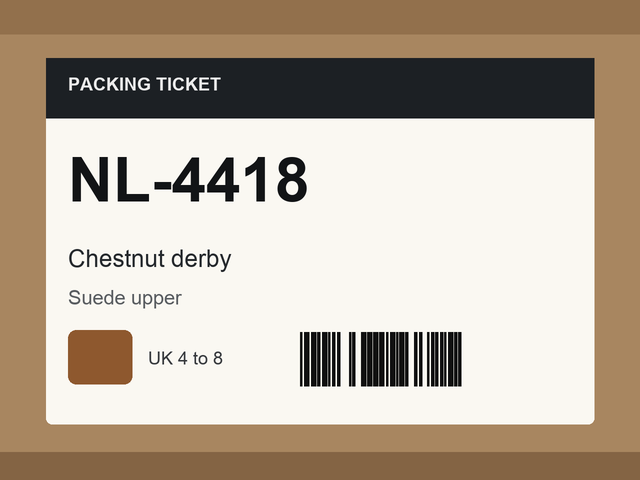
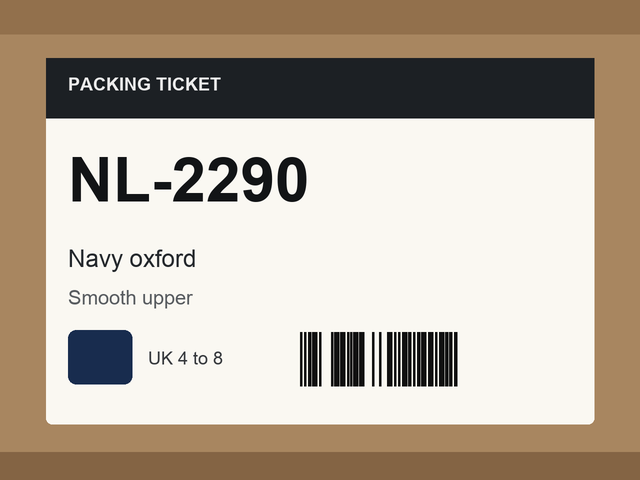
Stops a draft that groups photographs of two different box or ticket labels, so mixed deliveries do not reach the studio or the copywriting stage.
Classification & Tagging
Footwear retail
Scheduled worker
Productised
Local/private
2026
The problem
When two styles are dropped together they become one card and would be published as a single shoe. A later save can also put a rejected draft back if the rejection is not locked.
What it does
The tool reads the barcodes and printed style codes on the draft's photographs. Two pictures of the same hang tag are left alone. Two different printed style codes reject the draft and lock its status. Every run checks again and returns the draft to review once the labels agree.
Outcomes
Mixed deliveries are stopped before the studio or copy stage.
Two pictures of the same tag stay together.
A rejection survives a later save.
A draft is restored automatically once a misread barcode is corrected.
Simplified mockup
Interactive preview with sample data. Nothing is sent to a server.
Draft NL-4418
Mixed labelsLocked
Box tickets on this card
2 style codes
NL-4418 · chestnut derbyNL-2290 · navy oxford
Studio stays closed while two style codes are on the card.
Lift
Navy ticket is still on the card
Navy ticket NL-2290 lifted off the draft. One style code remains. Recheck will return the card to review.
Recheck
Waiting
Labels agree on NL-4418. Draft is back in review and studio can take it.
Draft NL-4418, second frame
Same hang tagIn review
Two pictures, one code
First frame · NL-4418Second frame · NL-4418
Same printed style code on both frames. The gate leaves the card in review. Studio and copy stay open.
Studio openCopy open
Draft NL-7701
Rejected and locked
Casual save
What the save does
Lock is held
After the save
Field
Before
After
Status
Rejected
Rejected
Lock
Held
Held
Studio
Closed
Closed
How it works
Read barcodes and printed style codes on the draft's stills.
Ignore two pictures of the same hang tag.
Reject the draft when two different style codes are present.
Lock the status so a later save cannot undo the rejection by accident.
Check again on the next run and restore the card once the labels agree.
Pipeline
flowchart LR
  A[Draft stills] --> B[Read codes]
  B --> C[Same tag]
  B --> D[Two style codes]
  D --> E[Reject and lock]
  E --> F[Recheck]
  F --> G[Restore]