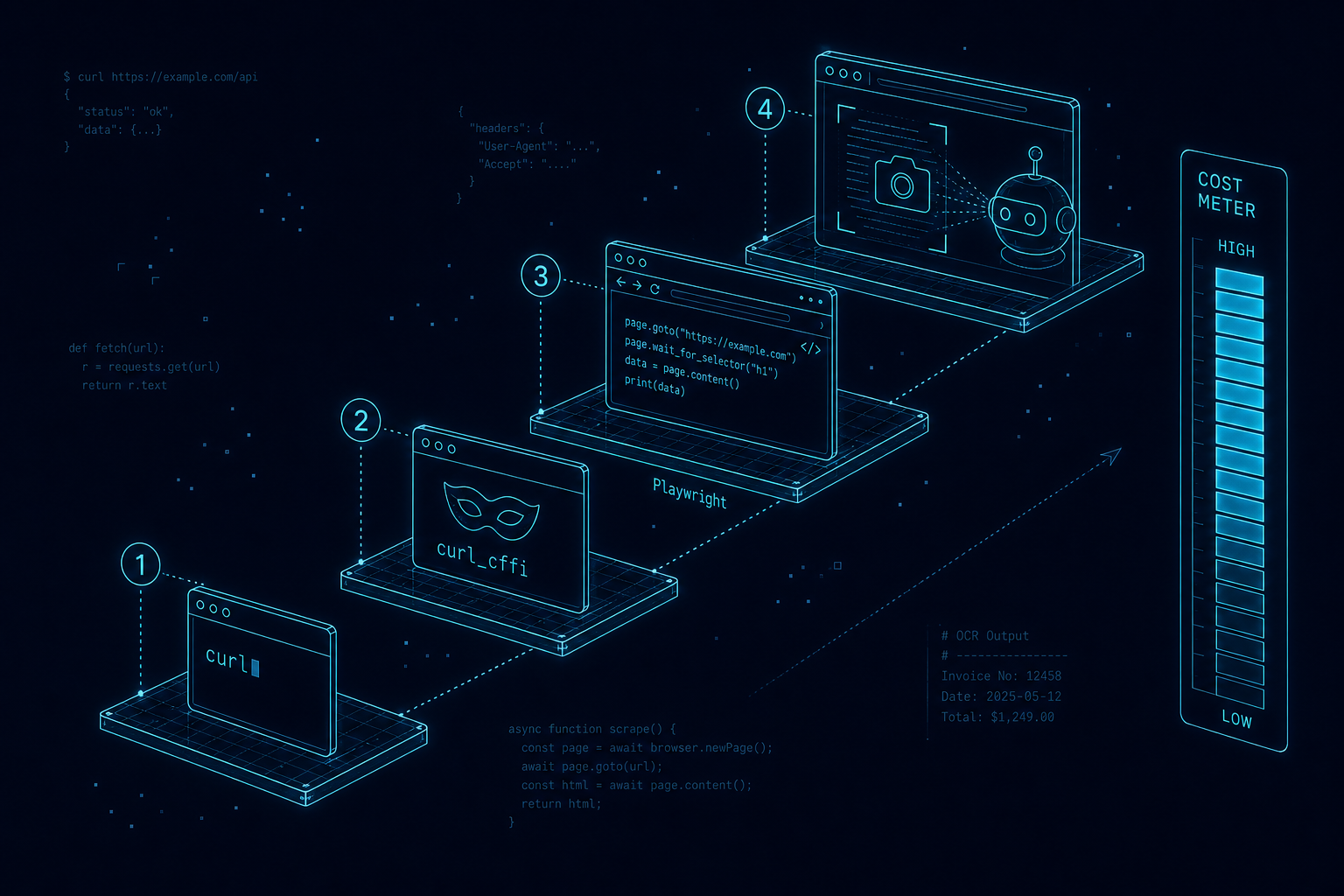
In the myth-busting piece we made a claim in passing and then moved on: that the ability to render a JavaScript page “exists but is rationed”, and that cost decides what most bots actually see. This post opens the bonnet on that claim. Understand how a bot fetches a page — the ladder of techniques it climbs, and what each rung costs — and two things that usually feel like opposites suddenly become the same decision: how to make yourself legible to the AI assistants you want, and how to keep out the abusive ones you don’t.
The whole subject collapses into a single mental model: a ladder. At the bottom is a one-line command that costs almost nothing. At the top is a full computer pretending to be a person, reading the screen with its eyes. Every rung up multiplies the price. Bots — good and bad — climb only as high as they must, because nobody spends more than they have to.
The Fetch Ladder
Here is the ladder in full. Read it from the bottom up, and keep the right-hand idea in mind the whole way: cost climbs roughly ten-fold at every rung.
Nearly all crawling — the routine, at-scale kind that builds a search index or feeds a training corpus — happens on the bottom two rungs, because those are the only rungs cheap enough to run across billions of pages. That single fact is what makes the rest of this post tick.
Rung 1: curl and wget, the Plain Fetch
The humblest bot is a single HTTP request. curl asks a server for a URL and prints back exactly what the server sends — the raw HTML, before a single line of JavaScript has run. No rendering, no styling, no images. Its cousin wget does the same but will happily follow links and mirror an entire section of a site to disk.
# A plain fetch — this is what the overwhelming majority of bots do
curl -A "Mozilla/5.0" https://example.com/page

# wget, mirroring a whole section to local disk
wget --mirror --no-parent https://example.com/blog/
This rung costs almost nothing: a few milliseconds and a trickle of bandwidth. You could fetch a million pages from a laptop. That is precisely why it is the default for crawlers, and precisely why the advice from the last piece matters so much: if your content only appears after JavaScript runs, everything on this rung sees an empty shell. The cheapest, most common reader on the internet reads raw HTML and nothing else.
Rung 2: Headers and Browser Imitation
Every request carries headers — small labels announcing who is asking. The famous one is the User-Agent, the string a client uses to name itself (“I am Chrome on a Mac”). Others declare which formats and languages the client accepts.
curl https://example.com \
  -H "User-Agent: Mozilla/5.0 (Macintosh; Intel Mac OS X 10_15_7) Chrome/126.0" \
  -H "Accept: text/html,application/xhtml+xml" \
  -H "Accept-Language: en-GB,en;q=0.9"
Here is the catch that trips up amateurs and blocks amateurish bots: headers lie cheaply, but a connection has a fingerprint that does not. When any client opens a secure connection it performs a TLS handshake, and the exact shape of that handshake — the order of ciphers, the extensions offered — differs between real Chrome and a plain scripting library. Servers and CDNs read that fingerprint (often called JA3 or JA4) and can tell a Python script wearing a Chrome costume from the genuine article, no matter how perfect the User-Agent looks.
The counter-move is a library like curl_cffi, which impersonates a real browser’s TLS fingerprint as well as its headers, so the connection genuinely smells like Chrome:
from curl_cffi import requests

# Impersonate a real Chrome TLS fingerprint, not just its User-Agent
r = requests.get("https://example.com", impersonate="chrome")
print(r.text)
This is the cat-and-mouse rung, where scrapers and anti-bot vendors fight it out. But note what it still cannot do: run JavaScript. It is a better-disguised plain fetch, faster and cheaper than a browser, which is exactly why serious scrapers live here rather than climb higher. It buys camouflage, not comprehension.
Rung 3: Playwright and Actual JavaScript
When the raw HTML genuinely is not enough — the page is a JavaScript application that assembles itself in the browser — the only honest option is to run a real browser engine. Tools like Playwright and Puppeteer launch a headless (screen-less) Chrome, load the page, let its JavaScript execute, and then hand back the fully-built DOM — the same tree of elements your own browser would show.
from playwright.sync_api import sync_playwright

with sync_playwright() as p:
    browser = p.chromium.launch()
    page = browser.new_page()
    page.goto("https://example.com")
    html = page.content()   # the DOM *after* JavaScript has run
    browser.close()
A headless browser can do everything a person’s browser can, including device emulation: it can tell the page it is an iPhone with a small touchscreen, a particular time zone and a specific location, so it receives the mobile layout and any location-specific content. This is also how “fetch a page via the browser dev tools” works under the hood — the same Chrome DevTools Protocol that powers your inspector can be driven by a script.
iphone  = p.devices["iPhone 13"]
context = browser.new_context(**iphone)   # viewport, touch, mobile User-Agent
page    = context.new_page()
The power is total; the cost is brutal. A headless browser needs hundreds of megabytes of memory and takes seconds per page instead of milliseconds, so it simply does not scale to routine crawling. It is reserved for the one page a user explicitly handed to an assistant — never for the broad sweep. Rendering is a scalpel, not a firehose.
Rung 4: Screenshot versus OCR versus the DOM
Once a page is rendered in a real browser, there are two very different ways to turn it into something a model can read, and the distinction matters enormously for cost and accuracy.
The first path is to read the DOM or accessibility tree directly: pull the actual text and structure the browser has built. It is exact, it preserves headings and links, and it is cheap. This is what virtually every “browser” agent does by default, because there is no reason to guess at text you can simply read.
The second path is to screenshot the page and read the pixels — either with classic OCR (optical character recognition) or a multimodal vision model that “looks” at the image. This is how a full computer-use agent perceives a screen. It is powerful in the narrow cases where the DOM fails you: text baked into images, content drawn on a canvas, charts, or a page deliberately obfuscated to defeat scrapers. But it is slow, costs real money per image, and is lossy — two words touching on screen can merge, columns can scramble, and confidence is never total.
The practical upshot for a site owner is the tidiest rule in this whole piece: put your words in the DOM as real text and every rung of the ladder reads you cheaply and correctly. Force a bot to screenshot-and-guess and you have not protected anything worth protecting; you have merely degraded the experience for the legitimate readers who were happy to quote you.
The Cost of Malice, and Why Turnstile Is Enough
Now put the ladder to work on defence. Abusive automation — scraping prices, stealing content wholesale, stuffing spam through your contact form, testing stolen passwords against your login — only pays off at scale. And scale only pencils out on the bottom rungs, where each request is nearly free. Force the attacker up even one rung and their economics collapse: a campaign that was profitable at a million cheap requests becomes ruinous if each one now demands a full browser or a solved puzzle.
This is the entire logic behind a challenge like Cloudflare Turnstile. It costs a genuine human essentially nothing — often a single invisible check — but it forces automation to either run a real browser (rung 3, expensive) or pay a third-party solving service, on every single request. For a bot doing millions of attempts, that is fatal. You rarely need to hunt IP addresses or ban user-agents; you just need to make abuse cost more than it returns.
The nuance carries straight over from the last piece: the cheap fetch you would defend against is the same cheap fetch a legitimate AI uses to read and cite you. So do not wall the content. Gate the actions — the endpoints where a bot can actually do harm — and leave the reading wide open. Free to read, costly to abuse. That is the balance, and it is exactly the policy this site runs: an open door on every article, Turnstile on the contact form.
Turning the Tools on Yourself
Here is the reframe that ties this back to the wider series. Everything above is not just something done to your website — it is a toolkit you can point at your own operations. The very same curl, curl_cffi and Playwright that a crawler uses are how you build a private agent that fetches a supplier’s stock page every morning, reads a dashboard that has no export button, or drafts and reformats content at volume. If you have followed the series this far — SOPs as markdown, folder-based workflows, a local harness driving your Mac — this is the same machinery, now aimed at the open web on your behalf.
Day-to-day, that means an agent handling the dull, repeatable jobs: monitoring, reconciling, summarising, drafting. The interesting part is what happens when you point it at your own visibility.
A Worked Example: Gap Analysis from Search Impressions
One of the most valuable jobs you can hand a private agent needs no scraping of anyone else at all — only your own Search Console data. The premise is simple: Google already tells you every query you appear for, whether or not anyone clicks. Those impressions are a map of demand — the questions the market is already associating with your site. The gap is the difference between that demand and what your pages actually answer well.
An agent runs this loop end to end: export the impressions, cluster the queries into topics, match each cluster against the content you already publish, and flag the mismatches. The gold is in the rows with plenty of impressions but a poor average position or no dedicated page at all — that is proven demand landing on a page that half-answers it, or on nothing. Each one is a brief for a page that will almost certainly earn its place, because the audience has already told Google they want it. If you want the grounding on reading that impressions-versus-position data yourself, our older piece on Search Console impressions vs position is the primer, and the agent simply industrialises it.
Better still, the output writes itself in the shape the first half of this series demands: answer-first pages, with headings phrased as the questions your customers actually type — the exact structure that both a human and a bot on rung 1 will read cleanly.
A Closing Checklist
- Confirm your real content is in the raw HTML, so the cheapest, most common bots (rung 1) can read it at all.
- Do not try to hide content behind JavaScript or screenshots to “protect” it — you only lock out the legitimate readers who cite you.
- Leave article and product pages wide open; that openness is a visibility asset.
- Gate the actions — contact forms, logins, search, APIs — with a challenge like Turnstile, so abuse is priced out without blocking readers.
- Stop hunting IPs and user-agents by reflex; make abuse cost more than it returns instead.
- Point the same fetching tools at your own operations, and run a Search Console gap analysis to find the pages you have not written yet.
The ladder cuts both ways. The cheaper you are to read, the more citable you are; the more expensive you make an action, the safer you are. Get those two right and you are open to the web without being at its mercy. If you would like us to build the private agent — the gap analysis, the monitoring, the content pipeline — or to audit which of your endpoints actually need a gate, get in touch. For the strategy behind all of this, start with the myths worth ignoring.