The simplest API between a human and an AI agent is a folder. The owner drops a file into /input. The agent does the work. The clean result lands in /output. The handled original gets archived to /processed. There is no message bus, no queue server, no workflow platform, and nobody has to log in to anything. Every operating system on the planet already understands folders, and so does every AI harness, every script, and every cron job ever written. If you can drag a file from your desktop into a folder, you can operate the system.
This is the third piece in our series. The foundations post framed the technology stack; the SOPs post showed how to write the instructions an agent will actually follow. This piece gives those SOPs somewhere to do their work, and ends with a complete, runnable example you can clone in an afternoon.
Why Folders Beat Platforms
It is worth being explicit about what we are not using. We are not using Zapier, Make.com, n8n, Workato, or any of the workflow platforms that have spent the last decade convincing small businesses they need a vendor in the middle. There is a place for those tools — mostly when you genuinely need to wire two SaaS APIs together — but for the everyday work of processing files on your own machine, the filesystem is the better workflow engine. It is faster, free, private, audit-able, and outlives the vendor.
The state of the workflow is visible at a glance. Open the folder, see what is queued, what has been done, and what failed. Failures are recoverable: drag the file back from /processed into /input and try again. Onboarding a new team member to the system takes about thirty seconds — “put the supplier file here, the cleaned version appears there” — and there is nothing to forget, nothing to log in to, nothing to subscribe to.
The Canonical Layout
After running this pattern across dozens of small-business jobs, we have settled on a five-folder layout that handles every workflow we have come across.
| Folder | Purpose |
|---|---|
/input | Raw work to be done. The owner drops files here. |
/processed | Originals after handling, kept for audit. The tool moves them here automatically. |
/output | Clean results the human cares about. Datamerge-ready CSVs, generated reports, formatted documents. |
/errors | Things the tool refused to handle, with a .reason.txt alongside explaining why. |
sop.md & tool.py | The instructions and the worker, sat alongside the data they operate on. |
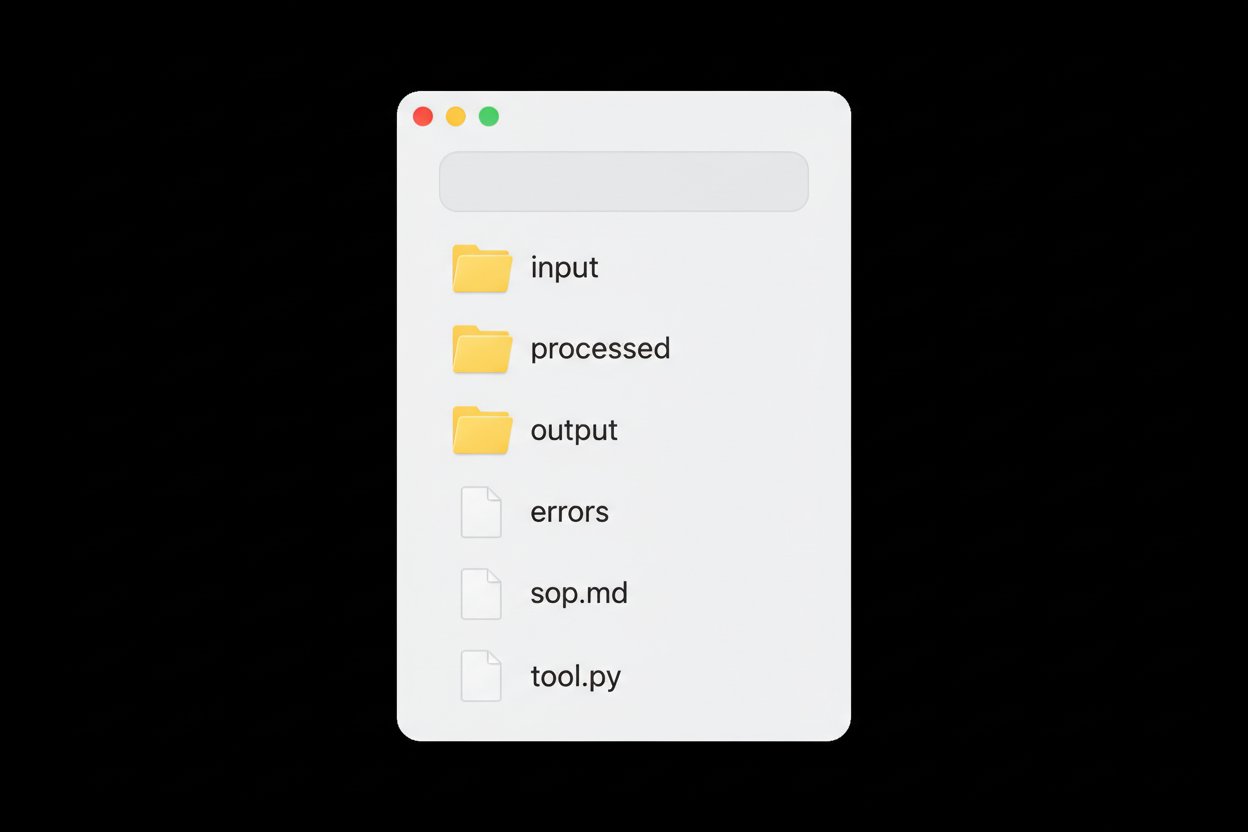
Every workflow we deploy follows this shape. The names rarely vary; the discipline is in keeping the structure consistent so that any agent, any new staff member, and any future-you walking into the project six months from now knows exactly where everything lives. A boring layout is a feature, not a bug.
Push vs Pull
Two patterns work, and they suit different jobs.
Push — the agent reacts the moment a new file appears — feels responsive but is more failure-prone. The watcher process can die quietly; permissions can drift; reboots can leave you wondering why nothing has run in a fortnight. Pull — the agent sweeps /input every fifteen minutes via cron or launchd on macOS — is far more robust. Most of the small-business jobs we ship run nightly or on a manual one-line command, and that is almost always the right answer. Save the file watcher for the genuinely interactive workflows.
Idempotency, Safety and Logging
Three rules of thumb separate a folder workflow that runs cleanly for a year from one that goes wrong on day two.
- Idempotent by default. The tool must be safe to re-run on the same file without doubling up. Outputs use deterministic filenames so a re-run overwrites cleanly. Nothing depends on which order files are processed in.
- Move, never copy. Move the original from
/inputto/processedthe moment it has been handled. A copy is an invitation to re-process the same file the next morning and discover yesterday’s data overwritten with today’s. - Log every run. A single
run.lognext to the tool, appended after each invocation. Date, file processed, rows in, rows out, errors. Three lines per run is enough to answer “why does Monday’s report look funny?”
2026-05-12T08:00:01  weekly-report.csv  in=247   clean=247  rejects=0
2026-05-12T08:01:14  invoices-may.zip   in=43    clean=42   rejects=1
2026-05-13T08:00:00  weekly-report.csv  in=251   clean=249  rejects=2
2026-05-14T08:00:00  weekly-report.csv  in=263   clean=260  rejects=3
That is what audit looks like in a five-person business. No log management platform, no observability vendor, just a text file that tells you what the agent did and when. If something feels off on a particular morning, the first thing you read is the log; ninety per cent of the time the answer is in there.
Agent vs Script: Division of Labour
The folder pattern works because it lets a fixed script and a flexible agent share the work in a way that plays to each one’s strengths.
The script is the one writing 95% of the output: a fixed pipeline, the same input shape, the same output shape, no surprises, no token cost, runs in milliseconds. The agent is the one who notices the unusual file in /errors, reads the reason, and either patches the tool, escalates to a human, or writes a small one-off script to handle the awkwardness. Together they are unbeatable. Either one alone is a compromise: a pure script will choke on the surprises; a pure agent will burn tokens doing trivial work the script could have done in milliseconds.
One Folder per Job
The temptation, once the pattern works, is to make a single giant /input that handles “anything you throw at it”. Resist it. One folder per job is a hard rule. The folder name is documentation in itself: /supplier_pricelists_to_import tells you exactly what belongs there. /input tells you nothing. Smaller, well-named folders make every SKILL.md shorter, every failure mode obvious, and every audit trail clean.
A small business with five of these folders running has automated more workflow than most businesses ten times its size, with a stack a single owner can fully understand.
Worked Example: Address Datamerge Cleaner
The rest of this post is a complete, runnable workflow. The job is one we run for several clients: a supplier hands over a CSV of names and addresses; before it can be loaded into a datamerge or a CRM, the postcodes need validating and the addresses need a consistent casing. Doing this by hand on three thousand rows takes an afternoon. Doing it with the agent takes about a minute, including the time to drag the file in.
The folder layout is exactly the canonical one:
scripting/address_datamerge_demo/
  input/       drop supplier CSVs here
  processed/   originals after handling, kept for audit
  output/      clean and reject CSVs ready for the next step
  errors/      tool-level failures
  sop.md       instructions the agent reads
  tool.py      the worker
  run.log      one line per run
The sop.md is short and imperative, in the style of the previous post:
# Address Datamerge Cleaner

Use when the user asks to clean a supplier address list, prepare a
datamerge, validate UK postcodes, or format addresses for a mailout.

## Steps
1. Place one or more supplier CSV files in `./input/`.
2. From the project root run:
   `python3 scripting/address_datamerge_demo/tool.py`.
3. The tool processes every `.csv` in `./input/` in turn, writing a
   `<source>_clean.csv` and (if needed) a `<source>_rejects.csv`
   into `./output/`, then moves the original into `./processed/`.

## Validation
- Postcodes are checked against the official UK format
  (`A9 9AA`, `A9A 9AA`, `A99 9AA`, `AA9 9AA`, `AA9A 9AA`, `AA99 9AA`).
- Whitespace is trimmed; the postcode is uppercased; a single space is
  inserted before the final three characters.
- Rows missing `name`, `address1`, `town`, or `postcode` are rejected.

## Formatting
- `name`, `address1`, `address2`, `town` are converted to title case
  while preserving common abbreviations (UK, PO, etc.).
- A `country` column is added with `United Kingdom` if absent.
The Python tool is around 150 lines — small enough to read in one sitting, big enough to handle the real-world messiness of supplier data. The interesting bits are the postcode regex (the one BS 7666 wants you to use rather than the simplified version everyone tries first) and the casing function (which preserves “UK”, “PO”, hyphens like “Mary-Jane”, and apostrophes like “O’Brien” rather than mangling them).
UK_POSTCODE_RE = re.compile(
    r"^(GIR 0AA|"
    r"[A-PR-UWYZ]([0-9][0-9A-HJKPSTUW]?|[A-HK-Y][0-9][0-9ABEHMNPRV-Y]?) "
    r"[0-9][ABD-HJLNP-UW-Z]{2})$"
)

PRESERVE_TOKENS = {"UK", "PO", "GB", "USA", "II", "III", "IV"}


def normalise_postcode(raw: str) -> str | None:
    if not raw:
        return None
    cleaned = re.sub(r"\s+", "", raw).upper()
    if not (5 <= len(cleaned) <= 7):
        return None
    formatted = f"{cleaned[:-3]} {cleaned[-3:]}"
    return formatted if UK_POSTCODE_RE.match(formatted) else None


def title_case(value: str) -> str:
    cleaned = re.sub(r"\s+", " ", value.strip())
    out = []
    for word in cleaned.split(" "):
        if word.upper() in PRESERVE_TOKENS:
            out.append(word.upper())
        elif "-" in word:
            out.append("-".join(p.capitalize() for p in word.split("-")))
        elif "'" in word:
            head, _, tail = word.partition("'")
            out.append(f"{head.capitalize()}'{tail.lower()}")
        else:
            out.append(word.capitalize())
    return " ".join(out)
The main loop reads each CSV, applies validation and formatting, splits the rows into clean and rejected sets, writes both to /output with deterministic filenames, and moves the original into /processed. If the file is unreadable or missing required columns it ends up in /errors with a one-line reason file alongside — the agent or a human can pick it up from there.
Run it once on a sample CSV with ten rows, four of which are deliberately broken:
$ python3 scripting/address_datamerge_demo/tool.py
2026-05-15T12:24:02  sample_suppliers.csv  in=10  clean=6  rejects=4
The clean output is exactly what you would want to hand to a datamerge:
name,address1,address2,town,postcode,country,notes
John Smith,12 High Street,,Maidstone,ME14 1XX,United Kingdom,VIP customer
Sarah O'brien,Flat 3,47 Queen's Road,London,SW1A 1AA,United Kingdom,
Brown & Co Ltd,Unit 5 The Old Mill,Riverside Park,Sevenoaks,TN13 1AB,United Kingdom,bulk buyer
Acme UK Plc,PO Box 1234,,Reading,RG1 8AA,United Kingdom,
Graham Green,7 Oak Avenue,Suite 2,Bristol,BS1 4ST,United Kingdom,extra spaces
Emma Thompson,33 The Green,,Oxford,OX1 1AA,United Kingdom,
The rejects file tells you, in one column, exactly why each rejected row did not make it through:
name,address1,...,postcode,country,notes,reason
,99 Broken Lane,...,CT1 2EH,United Kingdom,anonymous,missing name
Mary-Jane Wilson,21 Station Road,...,BAD POSTCODE,United Kingdom,,invalid postcode
Test Customer,,...,W1A 1AA,United Kingdom,empty address,missing address1
Peter Parker,15 Spider Lane,...,NY10001,United Kingdom,US address,invalid postcode
The owner’s entire interaction with the system is “drag the file into /input, type one command, look at the result”. The agent’s entire interaction with the system is “read sop.md, run tool.py, summarise the log line”. Both sides are short, both sides are obvious, both sides are independent of any vendor on the planet.
Generalising the Pattern
Once this shape is comfortable, almost every repetitive small-business job fits into it.
| Folder | Drop in | Get out |
|---|---|---|
address_datamerge/ | Supplier CSV | Clean datamerge-ready CSV |
invoice_ocr/ | PDF receipts | CSV of line items, totals, dates |
quote_drafts/ | Customer email .eml | Draft HTML quote with line pricing |
product_categoriser/ | CSV of new products | Same CSV with category column populated by Ollama |
weekly_sales/ | (scheduled, no input) | Self-contained HTML sales report |
image_alt_text/ | Folder of product images | CSV of alt-text generated by a vision model |
Each one of these is a couple of hundred lines of Python or shell, a one-page SKILL.md, and a few hours of testing. After half a dozen of them, the agent is doing more measurable work in your business than your most recent hire. The difference is that the agent is documented, version-controlled, and never asks for a pay rise.
Closing Thought
Once a business has three or four of these folders running, the agent stops feeling like a chatbot and starts feeling like a junior member of staff who never goes home, never forgets a step, and leaves a tidy log of their evening’s work for you to read in the morning. The filesystem is the queue, the SOP is the training manual, and the script is the muscle. None of those three things require a subscription, a vendor, or a login.
In the next instalment of the AI Insights for Small Business series we will give the agent the rest of your machine to play with — AI harnesses and local computer control: terminals, MCP servers, AppleScript, and the surprising amount you can drive in plain English on a quiet afternoon. If you would like us to clone, customise and deploy a working folder workflow on your own machine before lunch, get in touch.