About Services Tools Blog Contact us

Explorer Release and Figure Feed

Copies an external news and figures feed onto an exploration company's site, images included, and warns when the feed has gone stale.

  • Scheduled Workers & Sync
  • Mining and exploration
  • Scheduled worker
  • Productised
  • Hybrid
  • 2026

The problem

New releases and the figures inside them were copied onto the site by hand. Images in a release were easy to miss, so some announcements went up without the chart that made them useful. A stale feed was only noticed when someone happened to look.

What it does

On a schedule the site reads the external release feed and writes each item as a news entry. The figures and images are downloaded with the release. A freshness check compares the newest feed date with an allowed age and raises a warning, so an old announcement is not shown as current.

Outcomes

  • Releases appear on the site without anyone pasting them in.
  • Each announcement keeps its figures and images.
  • A feed that stops moving raises a warning before a visitor notices.

Simplified mockup

Interactive preview with sample data. Nothing is sent to a server.

Site news

threshold 7 days
On the site
3
before this pull
Newest item
28 Sep
northern fence results
Figures missing
1
licence note has no chart
Published
DateReleaseFigures
28 SepNorthern fence results2
14 SepLicence renewal lodged0
02 SepSite visit notes1
Pull
Figures travel with the release.

Stale feed

Newest feed date
26 Sep
no newer item arrived
Threshold
7 days
then raise a check
Silence
14 days
past the threshold
News left as it is
DateReleaseOn the site
26 SepNorthern fence resultsunchanged
14 SepLicence renewal lodgedunchanged
02 SepSite visit notesunchanged
Check
A quiet feed should not look current.

Figures on releases

stored with the news row
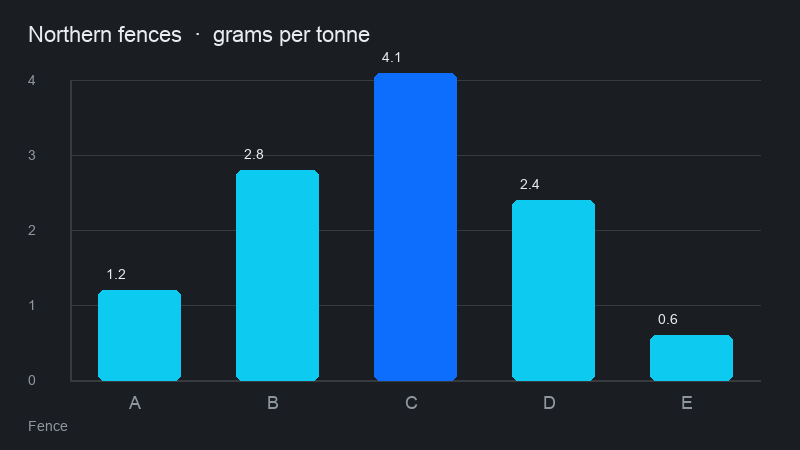
Northern fence results 28 Sep
Grade bars for fences A to E
Still in the feed not on the site yet
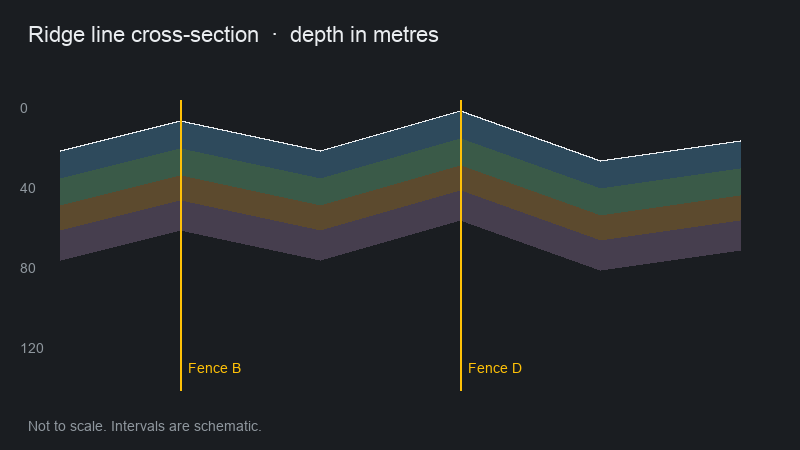
Schematic cross-section along the ridge
Quarterly update. Pull the feed on News to attach it.
What arrived with each release
ReleaseFigureKept with the row
Northern fence resultsGrade barsyes
Quarterly updateCross-sectionwaiting for the pull
Licence renewal lodgedNone in the feedno figure
Site visit notesCore shed photographyes

How it works

  1. Read the external release feed on a schedule.
  2. Match each item to an existing news entry or create one.
  3. Download figures and images into the release.
  4. Publish the news item with its figures attached.
  5. Compare the newest feed date with the allowed age and raise a warning if it is too old.

Pipeline

flowchart LR
  A[Release feed] --> B[Match news]
  B --> C[Fetch figures]
  C --> D[Site news]
  D --> E[Freshness check]
  E --> F[Alert or ok]

Output